The Product Utilization Report provides a transparent, daily view of how your practice is leveraging the PTWorkshops.com platform.
1. How to Access the Report
To view your practice's utilization data:
Log in to your PTWorkshops.com dashboard.
Click on the Insights tab in the left-hand navigation menu.
Select Product Utilization from the sub-menu.
2. Key Metrics Explained
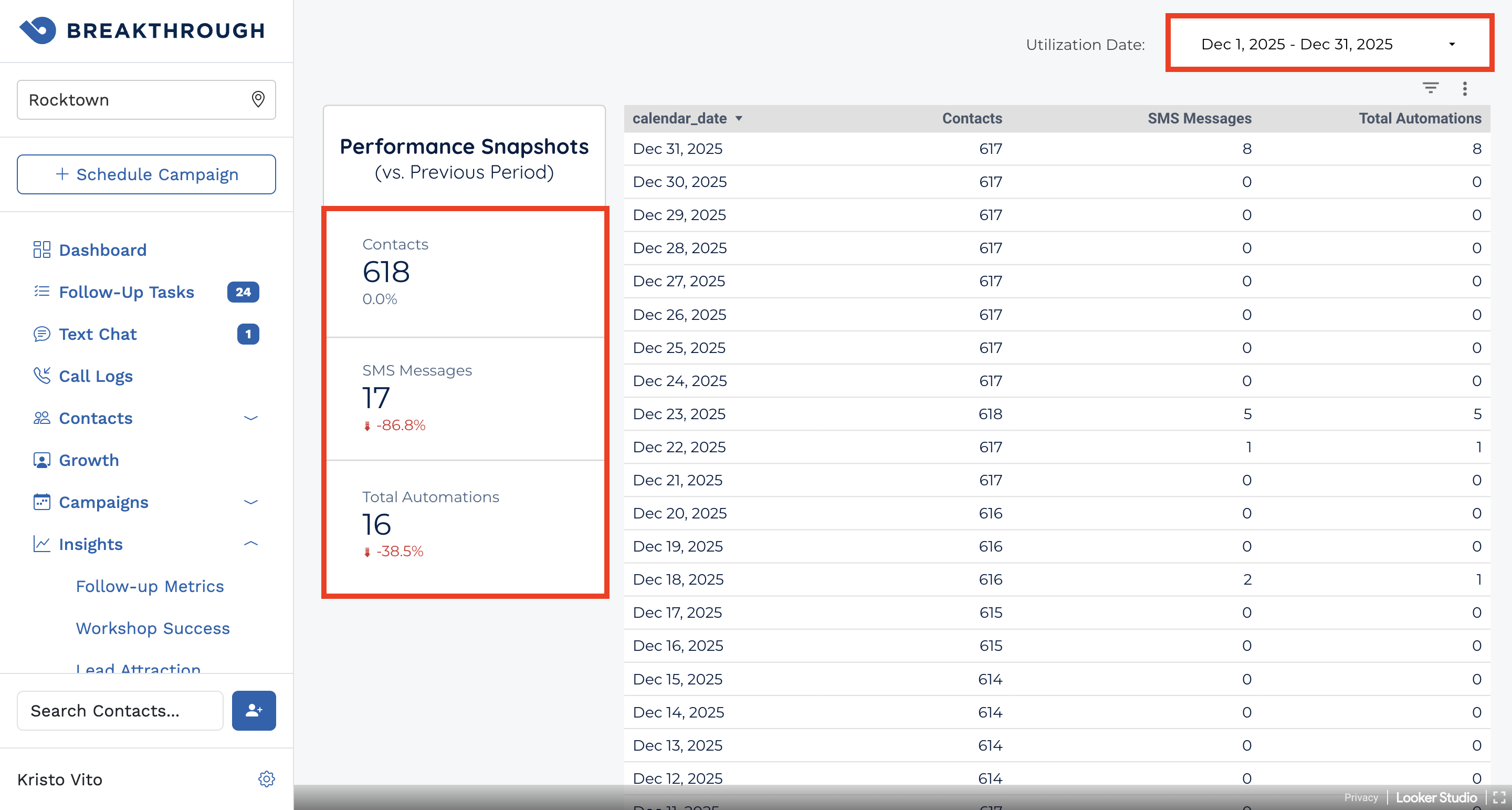
The report tracks three core metrics reported on a daily basis:
Total Contacts: The current number of records in your system.
SMS Messages: The total count of outbound text messages sent. These include messages triggered by both manual and automated campaigns.
Total AI Automations: Any task completed by the system's AI on your behalf, such as status changes or system-generated follow-up tasks.
Important Note on Data: Please keep in mind that there is a 24-hour delay on data appearing in this report. Activity that occurs today will be visible in your report tomorrow morning.
3. Analyzing Your Usage
Date Range Selection: Use the date picker at the top-right to view data for a specific month or a custom timeframe.
Performance Snapshots: The left-hand sidebar shows a "Performance Snapshot" comparing your current usage to the previous period.
Example: A snapshot showing a decrease in SMS Messages may reflect a period where your cold market funnels were less active compared to the month prior.
4. Troubleshooting & FAQ
| Issue | Likely Cause | Solution |
| I don't see today's activity | 24-Hour Delay | Data takes 24 hours to process. Please check back tomorrow to see today's updates. |
| Snapshots show a large % drop | Period Comparison | This simply compares the current selected range to the previous one; verify if your marketing spend or funnel activity changed between those periods. |
Was this article helpful?
That’s Great!
Thank you for your feedback
Sorry! We couldn't be helpful
Thank you for your feedback
Feedback sent
We appreciate your effort and will try to fix the article