Jump To:
- What is an Email Broadcast?
- What time do broadcast emails send?
- Can I save my email blasts or preview them after scheduling?
- Can I attach a PDF or Picture to my email?
What is a Custom Email Campaign (Broadcast)?
The Custom Email Broadcast feature allows you to send an email out to your entire email list. Broadcast emails are meant to be simple announcement emails and do not currently support dynamic tokens or attachments.
For this reason, we recommend limiting your broadcasts to simple content like:
- Severe inclement weather
- Practice emergencies
- Special hours
Note: Do not use Email Broadcast to do anything Breakthrough does for you—workshop reminders, as a replacement for Monthly Campaigns, or patient phase emails.
How to Send an Email Blast:
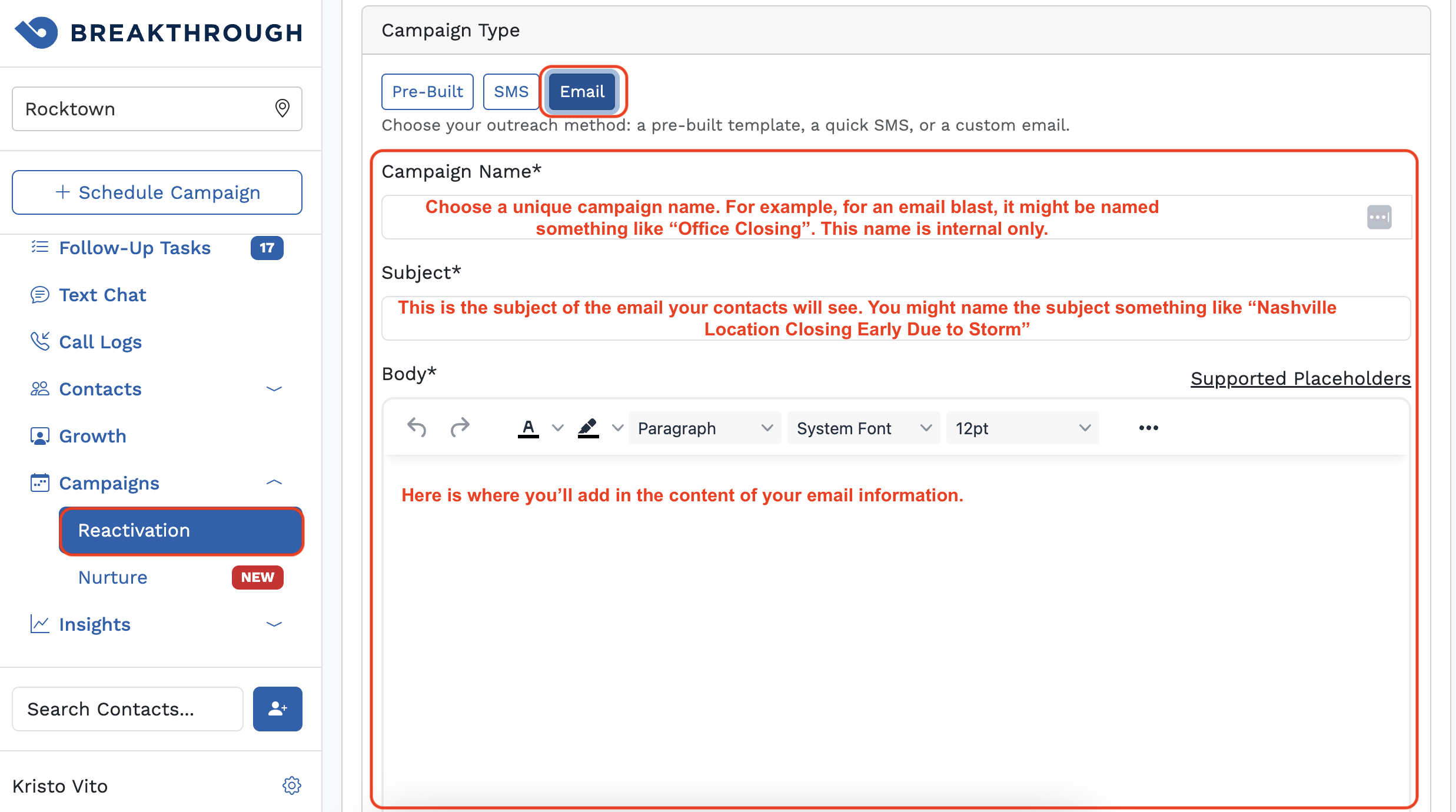
- Click Campaigns, then Reactivation on the side navigation bar. (If you have multiple practice locations, make sure you are in the correct location first.)
- Click +Schedule Campaign at the top right.
- Under Campaign Type, choose Email.
- Fill out the Campaign Name, Subject, and Body.
- Click the Show More Options for the dropdown menu to open.
- Select the appropriate audience - in this case where you want to send an email blast to everyone, you might choose 'All Contacts.' (The 'Drip' campaign option should be off by default - no need to change this for an email blast.)
- Click Schedule.
What time do custom emails send?
You can only select a date and specific time for your emails to be sent if you are choosing the Pre-Built email campaign option first, and then editing it to make it your own customized email campaign. (This will give you the option to choose 'Edit' and selecting 'Show More Options' > 'Timings.') We recommend sending emails between 9-11 AM local time.
Can I save my custom email blasts or preview them after scheduling?
You can only save the email if you are choosing the Pre-Built email campaign option first, and then editing it to make it your own customized email campaign. But with just a custom email blast from 'scratch', you cannot save them currently. Once it is scheduled, you can preview it, view contacts, and view the message logs.
Can I attach a PDF or Picture to my email?
The custom email broadcast feature does not currently support attachments or pictures, because this can change the formatting of your emails and make for a not-so-pleasant reader experience! It is not the best experience for contacts that may receive the email due to different email settings each individual may have in place, and in some cases it can be flagged as spam. We recommend not including any images or attachments. Please ask your CSM or support@getbreakthrough.com if you have questions.
Was this article helpful?
That’s Great!
Thank you for your feedback
Sorry! We couldn't be helpful
Thank you for your feedback
Feedback sent
We appreciate your effort and will try to fix the article