Jump To:
- What are Subscription Preferences?
- How to Check if a Contact is Unsubscribed
- Email Subscription
- Direct Mail Subscription
- Text Subscription
What are Subscription Preferences?
- To comply with contact regulations, we include a link in every email where contacts can request to unsubscribe.
- Contacts can unsubscribe from text messages by replying STOP (or any of the supported unsubscribe keywords) to any message you send.
- Note: If you have the AI Agent enabled, and a contact says something like "don't contact me anymore" or "stop texting me" - The AI Agent will respond that it will make a note of this, and should alert you in a Review Needed notification, but the AI Agent will NOT automatically unsubscribe the contact for you - This will need to be done manually.
- This is different than when a contact specifically sends one of the supported unsubscribe keywords, such as 'STOP' or 'END' - In that case, the system itself (not the AI) will automatically unsubscribe the contact from texts.
How to Check if a Contact is Unsubscribed/Subscribed
Even though there's no way to see a list of all unsubscribed or subscribed contacts directly in the software in one place, you can export all of the contacts from the "Settings" > "Manage Contacts" > "Export Contacts" page, and you can see in that export list a column that shows email and text unsubscribes and subscribes of all contacts. (You can filter your exported list to show just the unsubscribes or subscribes.)
To check an individual contact's subscription preferences:
- Search for the contact to open the contact's record
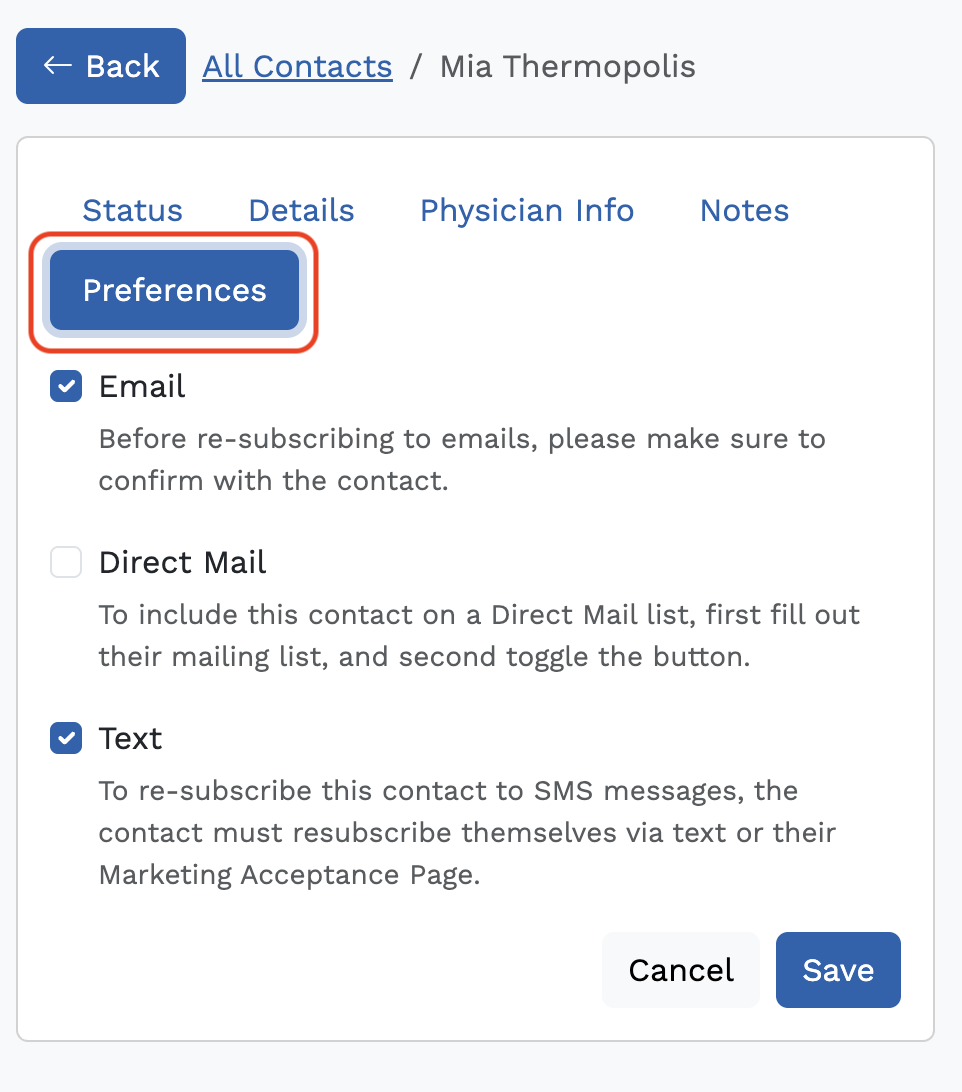
- You will see the Preferences option - click on that
- You will see the Email, Direct Mail, and Text subscriptions either checked or unchecked. (Note: Breakthrough does not send direct mail to your contacts. The direct mail option is only for your internal reference if you send mail to contacts.)
- Update the preferences and click Save.
Email Subscription
- Contacts that are unsubscribed to Email will not receive monthly email campaigns, automated indoctrination campaigns, or email broadcasts.
- Contacts can unsubscribe to emails at any time by clicking the 'unsubscribe' link at the bottom of any email.
- To opt-in to emails after unsubscribing, you can manually toggle the Email switch on the Contact.
Direct Mail Subscription
- Contacts that are unsubscribed to Direct Mail will receive monthly email campaigns and indoctrination emails but will not receive email broadcasts.
- Contacts can unsubscribe to emails at any time by clicking the 'unsubscribe' link at the bottom of any email.
- To opt-in to emails after unsubscribing, you can manually toggle the Direct Mail switch on the Contact.
Text Subscription
- Contacts that are unsubscribed to Text will not receive any automated text messages and you will not be able to send them a text from within Breakthrough.
- Contacts that wish to opt-in to texts after unsubscribing must resubscribe by texting "START" to your tracking number.
- Note: You cannot manually re-subscribe contacts to Text like you can with Email.
There are specific keywords a contact can text us to be added or removed from SMS communications. These keywords are not case-sensitive:
Was this article helpful?
That’s Great!
Thank you for your feedback
Sorry! We couldn't be helpful
Thank you for your feedback
Feedback sent
We appreciate your effort and will try to fix the article