TABLE OF CONTENTS
- Understanding Your License Type
- Practice Phone Number vs. Tracking Number:
- Can You Change the Number The AI Agent Provides?
- Configure the AI Agent's Insurance Information
- Frequently Asked Questions
Learn how the AI Agent uses your practice’s phone number and tracking number, how your license type affects call tracking features, and how to configure your AI Agent’s insurance information.
The AI Agent (Emily) uses your practice’s phone number and a tracking number for different purposes. Understanding the difference can help prevent confusion when patients interact with your AI Agent or receive SMS messages.
The phone number the AI Agent provides to patients and the number that appears as the sender of SMS messages may be different. This is expected behavior, particularly for accounts with a Core license.
Understanding Your License Type
How the AI Agent works with your tracking number depends on your Breakthrough license type.
Core License - If your account is under the Core license type:
- Call recording and call tracking are not available.
- The tracking number associated with the AI Agent is used for SMS campaigns to track and log conversations in Breakthrough.
- The tracking number may appear as the sender when the AI Agent sends SMS messages.
- The AI Agent should provide the practice’s actual phone number when a patient asks for the office phone number.
If your account’s license type should be different from the call tracking features currently available, reach out to your Customer Success Manager (CSM) for assistance.
Practice Phone Number vs. Tracking Number:
The AI Agent uses two different numbers for different purposes.
Practice’s Actual Phone Number
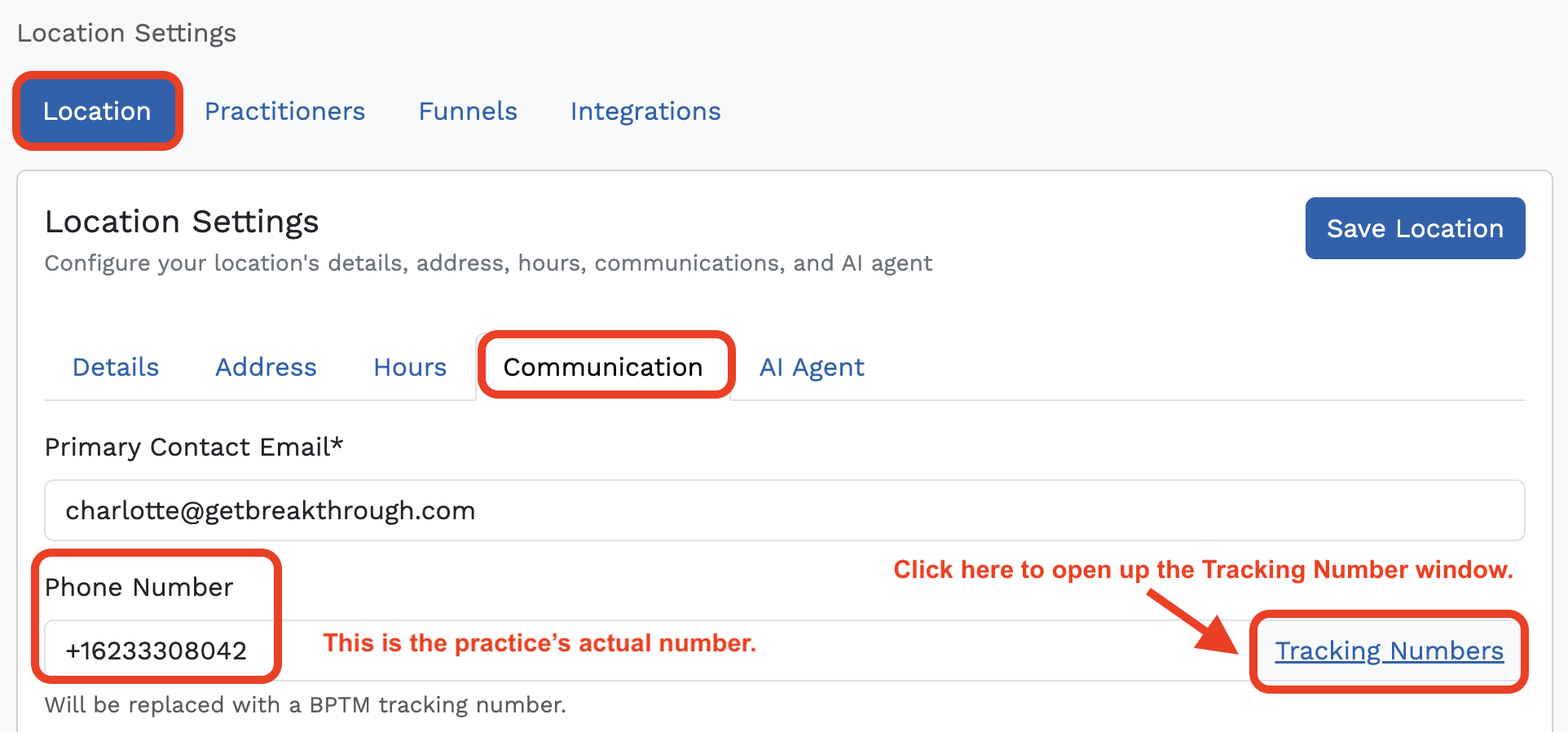
This is your office’s primary phone number. The AI Agent should provide this number when a patient specifically asks for the office phone number.
You can view the practice’s phone number in:
Location Settings → Communication
The AI Agent (Emily) is configured to provide the practice’s actual phone number when a contact asks for the office phone number.
Tracking Number
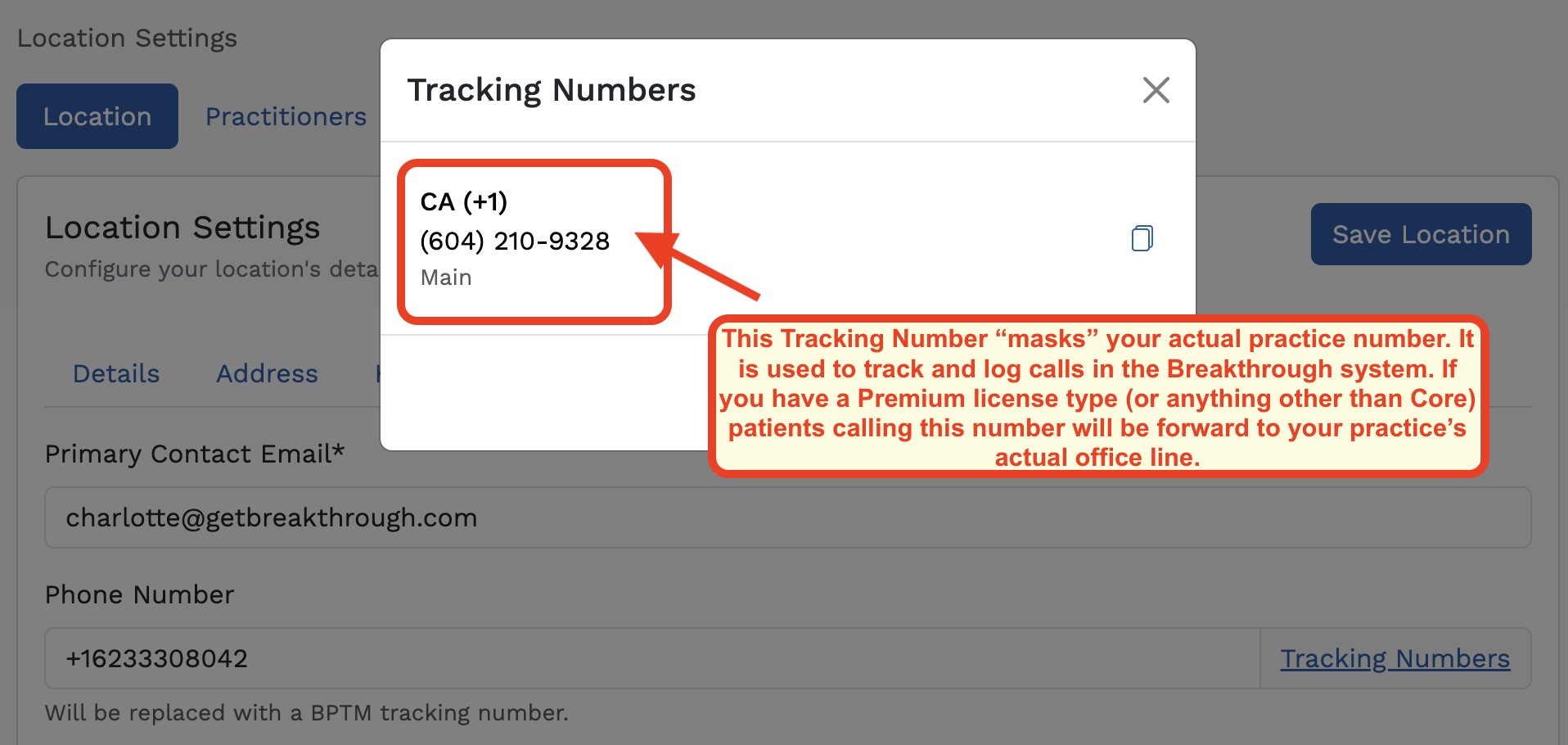
The tracking number is associated with the AI Agent and is used for SMS campaigns so conversations can be tracked and logged in Breakthrough.
For Core license accounts, the tracking number may appear as the sender when the chatbot sends text messages. This does not mean the tracking number is the practice’s primary office phone number.
Why Patients May See the Tracking Number
When a patient receives an SMS from the AI Agent, they may see the tracking number displayed in the conversation and assume it is the number they should call.
To avoid confusion, make sure patients understand:
- The tracking number is used for SMS conversations and tracking.
- The practice’s actual phone number is the number they should use when calling the office.
Important: This tracking-number behavior applies to the SMS functionality associated with Core license accounts.
Can You Change the Number The AI Agent Provides?
Currently, there is no way to customize the AI Agent's automated messaging to change which phone number Emily provides when a patient asks for the office phone number. (Please contact support@getbreakthrough.com if you need an entirely new tracking number to be assigned.)
The appropriate setup is for the AI Agent to provide the practice’s actual phone number.
If you have concerns about the phone number the AI Agent provides, review your location’s communication settings and contact your CSM if your account’s setup or license type needs to be reviewed.
Configure the AI Agent's Insurance Information
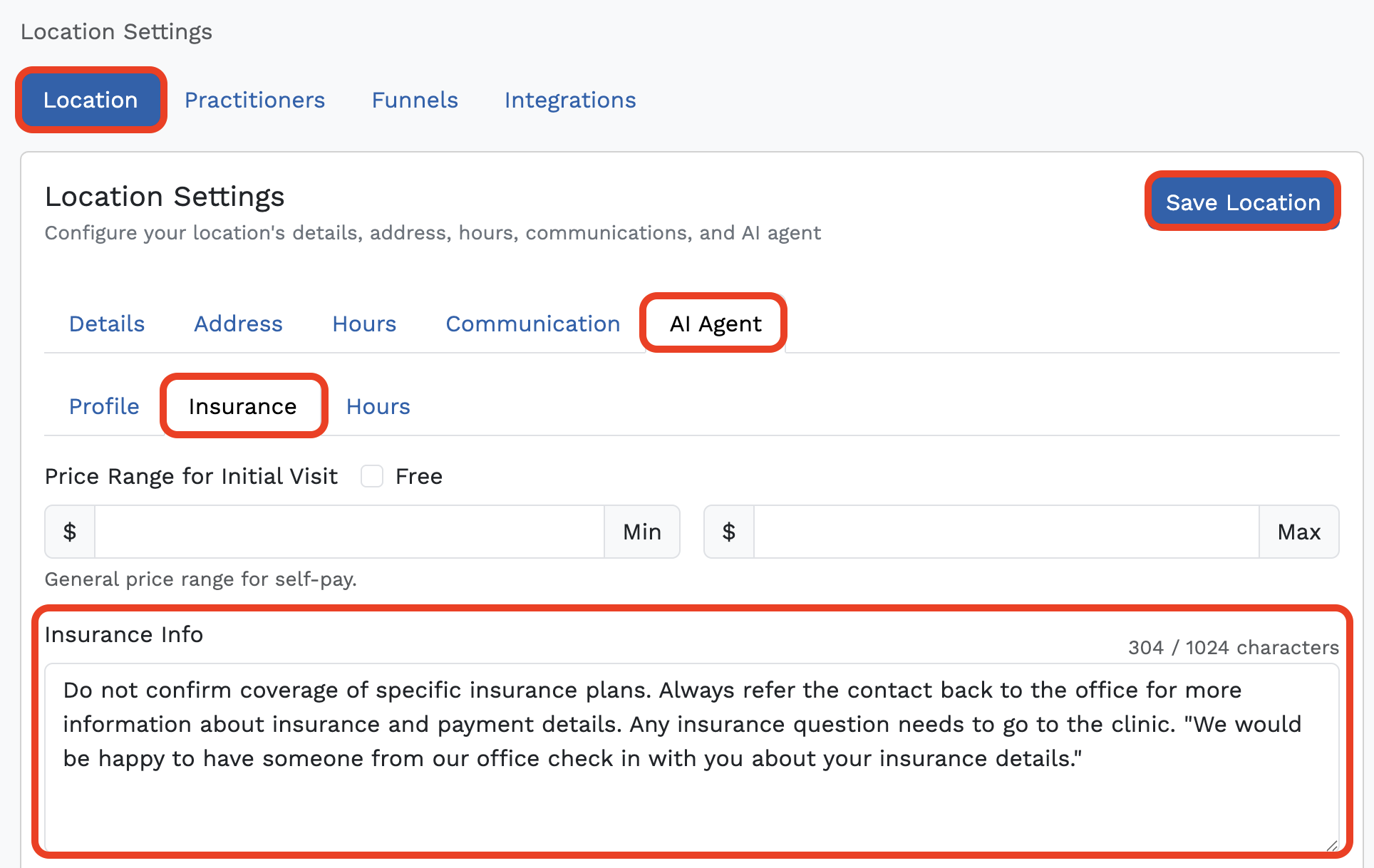
For the best patient experience, configure the AI Agent with as much detailed and specific information as possible in the Insurance Info section of your AI Configuration settings.
This helps provide the AI Agent with the information it needs when patients ask about insurance.
How to Update Insurance Information
- Log in to Breakthrough.
- Navigate to Settings.
- Select Location Settings.
- Choose your location.
- Open AI Agent.
- Select the Insurance tab.
- Enter detailed and specific insurance information in the Insurance Info field.
- Click Save Location.
Recommended Setup
Include any relevant insurance instructions, such as:
- Insurance plans accepted by your practice.
- Any important insurance-related details patients should know.
- Instructions for directing patients to the practice when specific insurance questions require confirmation.
The more specific and accurate the information provided, the better the AI Agent can follow your practice’s intended insurance instructions.
Frequently Asked Questions
Why does the chatbot show a different phone number than my office number?
The chatbot uses a tracking number for SMS conversations so they can be tracked and logged in Breakthrough. The AI Agent should provide your practice’s actual phone number when a patient asks for the office phone number.
Can I change the phone number Emily provides?
No. There is currently no way to customize the automated messaging to change which number Emily provides. The appropriate setup is for the AI Agent to provide the practice’s actual phone number.
Can patients call the tracking number?
The tracking number is used for SMS tracking and logging. For Core license accounts, patients are directed to the practice’s actual phone number (when they ask the AI Agent) they need to call the office.
What if my account should have different call tracking features?
Contact your Customer Success Manager (CSM) to review your license type and available call tracking features.
Where can I update the AI Agent's insurance instructions?
Go to:
Settings → Location Settings → Location → AI Agent → Insurance → Save Location
Enter detailed and specific insurance information to help the AI Agent follow your practice’s instructions.
Was this article helpful?
That’s Great!
Thank you for your feedback
Sorry! We couldn't be helpful
Thank you for your feedback
Feedback sent
We appreciate your effort and will try to fix the article